Staff App
Learn how to use the staff app for efficient operations
Staff App
The Staff App is a web-based mobile app optimized for tablets and touchscreen devices. It provides full functionality for managing customer check-ins and check-outs with support for camera and NFC reader devices.
Interface Gallery
The Staff App features an intuitive interface with the following main screens:
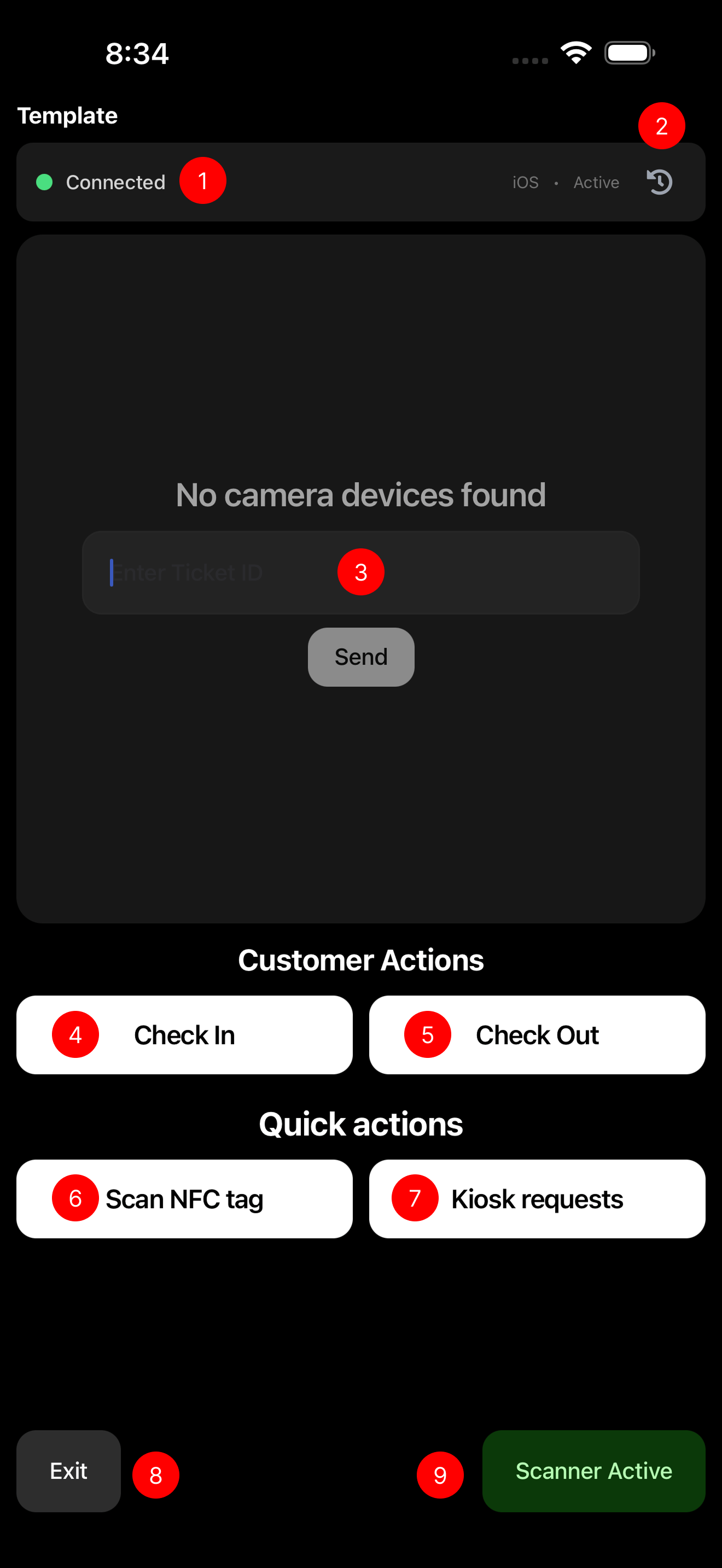
Check In - Process customer check-ins with ticket validation
Interface Legend
-
Realtime connection indicator - Shows when the app is connected to live data
-
Scan history - View recent scans and transactions
-
QR code scanner - Multi-functional scanner for tickets and pre-registrations
-
Check in functions - Process customer check-ins with ticket validation
-
Check out functions - Complete customer check-outs and return items
-
NFC registration and control - Assign and manage NFC tags
-
Pending kiosk requests (Beta) - View and process requests from self-service kiosks
-
Exit app - Safely log out from the staff app
-
Scanner toggle/reset - Enable, disable, or reset the camera scanner
-
Manual SMS ticket entry - Manually enter customer phone numbers for SMS ticket creation
-
Pre-registration list - View customers who pre-registered via SMS ticket
-
4-digit code redemption - Redeem tickets using a 4-digit code
-
Open ticket lookup - Search for and access open tickets for additional operations